
We are now a week on from the closure of Microsoft’s European Fabric Conference, and I thought it was a good time to reflect on the 4 days in Stockholm.
Value for money
As the owner of a small company where going to a conference like this means “paying my own way”, I really felt that I got value for money. It is quite a big investment – not just the conference fee, flights and hotel, but also the lack of billable client work. Conferences like this one are critical to my ability to stay up to date with the areas I’m already an expert in, but they also allow me to learn new skills. Most conferences have pre-con sessions – full day, in depth sessions – and these always allow me to break into a new area I’ve never touched before.
For example, at the brilliant Power BI Next Step conference in 2023, I attended Rui Romano and Mathias Thierbach‘s amazing session on Power BI Developer Mode (CI-CD). I’ve gone on to be able to teach this to others. At FabCon, I went to a session on Data Factory from Alex Powers, Sunil Sabat and Jeroen Luitwieler. I’ve never been exposed to Azure Data Factory, and so I’ve struggled to do much with Fabric Data Factory. No more… since the session, I’ve been able to get my first pipelines up and running. Just as importantly, I got a lot of understanding of product direction.
Data Factory Product Direction
My disclaimer – this was the perception I got from the session – and Microsoft may say something slightly different.
Fabric Data Factory takes all the capabilities of Azure Data Factory (minus some connectors etc which are on the way) and combines it with a new generation of familiar former Power BI features (namely Dataflows). I’ve been working with Dataflows for many years (Power BI Gen 1 Dataflows), and I believe that Gen 2 Dataflows were probably on their way with or without the release of Fabric.
I think Microsoft have done a great job of seizing the opportunity in Fabric to combine the best of their integration tooling. For example, “Fast Copy” has been a feature of Data Pipelines in Azure Data Factory previously – Azure Data Factory is designed for data engineers to manage massively scalable movement of data. Dataflows were designed for analysts to connect to data and share their transformations – on a smaller scale (gigabytes instead of petabytes). However, now that the product teams are all working together in a single Fabric team, the features are coming together a bit more. Fast copy has been introduced to Dataflows and offers major speed boosts in the right circumstances. These circumstances are when you are pulling data in from a source without major transformation. You will use a Dataflow Gen 2 with fast copy, write the data into a Lakehouse, and then build a subsequent dataflow to transform the data as required. We will see more cross pollination of these capabilities.
It was also evident that over time, Azure Data Factory users will need to consider migrating to Fabric Data Factory. I’m sure Azure Data Factory will be supported for years to come, but a few things were clear:
- The key product team people from Azure Data Factory are now working in the Fabric Data Factory team
- New innovation is coming to Fabric Data Factory – and not all the innovation will be available in Azure Data Factory.
- Microsoft are starting to put in place measures to help customers migrate to Fabric Data Factory – for example, allowing all Azure Data Factory pipelines to be run from Fabric Workspaces, and creating new PowerShell scripts to actually migrate a pipeline from Azure to Fabric. I thought the ability to orchestrate Azure Data Factory pipelines from Fabric was clever – just because it can encourage data engineers into the Fabric ecosystem and provides visibility of pipelines to all personas where things may have been opaque before.
If I was responsible for Azure Data Factory in an organisation, I would definitely start doing my homework about transitioning to Fabric.
Changes in overall platform messaging
I noticed a few subtle changes to the way that Fabric as a platform is presented. The overall platform slides from FabCon have a couple of noticeable differences from older slides (like the one below).
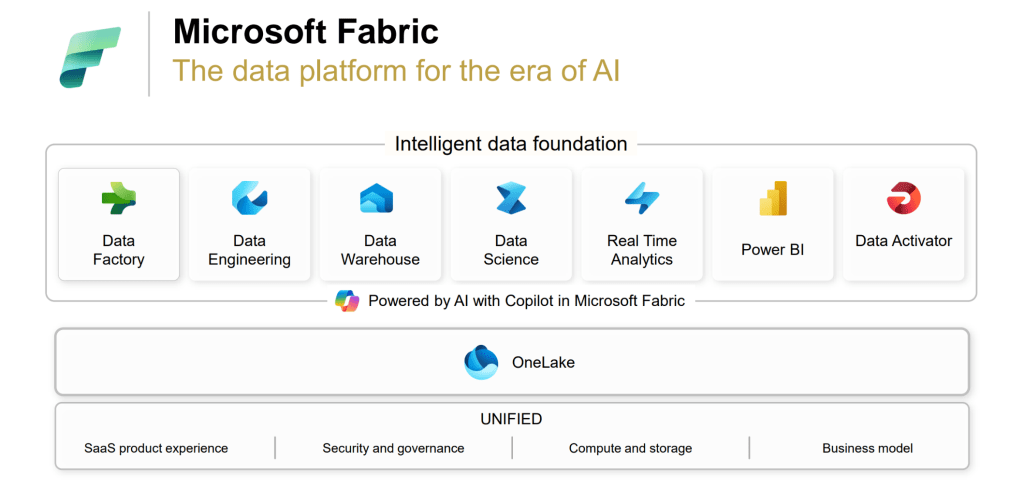
The keynotes at this conference had two changes.
- Data activator was combined into the Real Time Analytics element and does not appear as a separate component. I can see the logic of this because data activator offers the greatest opportunities when used with real time data, but we mustn’t forget that it works with batch data too. The product is still in preview, but I see a lot of power there and I hope it doesn’t lose prominence in the messaging from Microsoft.
- Purview was shown underneath OneLake across all workloads. Giving Purview greater prominence reflects Microsoft’s investments in that area. There is a new generally available version of Purview which is a lot more complete – including business domains, a full business data catalogue (which links more effectively to the technical metadata revealed during scans) and a data quality solution. Purview also offers inheritance of sensitivity labels right across objects in the Fabric ecosystem now. The plan is to embed Purview more and more into Fabric – making sure that we are governing and securing the data that we are ingesting, transforming and using in Fabric.
Impressive innovation
It is very clear that Microsoft are continuing to put a huge amount of investment into Fabric. The number of new features announced was impressive, but also the impact of these features was notable.
For example, Fabric now has its own native Spark engine which is up to 8x faster than using the standard Spark engine. This is essentially a reduction in the cost of using Fabric, because the same workload will take less time to complete, reducing consumption units used.
One of the major themes of the announcements was the integration of Copilot into more experiences. I was surprised to find that this was a little controversial in the audience. Many people that I spoke to were frustrated that quite so much investment was going into embedding Copilot AI experiences into Fabric. I think there is a disconnect between some Fabric enthusiasts and Microsoft on this. Many people would prefer that Microsoft invest more in closing product capability gaps (for example, connectors in Azure Data Factory which are not yet in Fabric Data Factory) rather than focusing on Copilot as much (I heard for example “do we really need Copilot in Power BI mobile right now?”).
Personally, given that Fabric has the tagline “the data platform for the era of AI”, it was clear that Microsoft needed to go in this direction to fulfil this promise. As someone who has not coded throughout their career, having Copilot embedded to help me can be really valuable. I don’t need it in the Dataflows, Semantic Modelling or Reporting experiences, but I definitely will benefit from it when working in Notebooks. However, others with different experience will value it in different places. At the end of the day, adding Copilot widely makes all the experiences more accessible to people with different backgrounds and I see huge value in that.
We do also need Microsoft to provide us with options around Copilot. For example, the new capability to search across all models/reports in a Fabric tenant to get a question answered is great, but… how do we prevent Copilot from returning a result from a model which has not been properly governed? At most of my clients, we have Enterprise driven reports with a high level of governance, and self service driven reports with a lower level of governance. The idea is to have options for both robustness and pace – depending on the use case. I would like to see options in Tenant Settings to only allow Copilot to return results from Promoted / Certified models/reports, or to only provide results from models refreshed with X days, etc. We need lots of control around this to ensure it doesn’t lead to incidences of people making decisions on models which were not intended for those decisions.
Finally – its safe to say that Microsoft brought a lot of new features to us at FabCon. For those originally from the Power BI world, the Power BI specific list was maybe only moderately long/impressive – and much of it was geared toward better integration with other elements of Fabric (for example, editing DirectLake semantic models in Power BI Desktop), but that is to be expected. We need to remember that Power BI is now quite mature and it’s not so easy to deliver “gasp worthy” improvements now. Personally, I will continue to learn as much as I can about the other elements of Fabric (hence attending the Data Factory sessions) so that I can influence the upstream data transformation and make my Power BI work easier, faster, etc. Therefore the pace of Fabric change / improvement is very welcome. I won’t try to repeat all the announcements – it’s better to check the official blog from Microsoft for this.
PS – One request Microsoft… please, please can you get Gen 2 dataflows working with Deployment Pipelines asap… I want to adopt them widely at one client, but we can’t do that until we have Deployment Pipelines… I know it is coming but I will keep making the point :).
The dream team
Finally, I wanted to say thank you to the organisers and Microsoft. It was a brilliant and valuable experience. Microsoft clearly invested heavily in this conference. The number of US-based product team members who attended and spoke was very impressive. I met some people that I’ve admired for ages and they didn’t disappoint!
I look forward to the next one. I’d love to hear your comments about the conference and the announcements.
 The Meloro Fabric Blog